
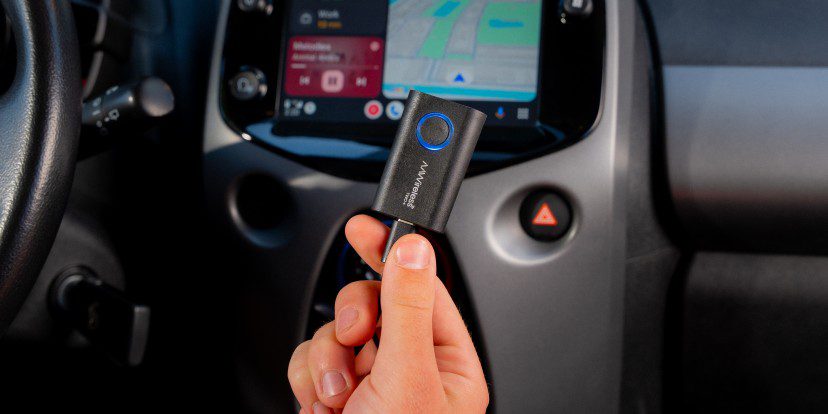
Connecting an iPhone to a car should be easy, especially when you want to use navigation, make calls, or listen to music while driving. However, some vehicles require a USB cable every time the driver wants to use Apple CarPlay. Although this connection works well, managing cables can become inconvenient during daily commutes and short trips.
A wireless CarPlay adapter offers a practical solution for drivers who want to reduce their dependence on a physical phone connection. The gray Wireless CarPlay Adapter for Apple iPhone is designed to convert a compatible factory-installed wired CarPlay system into a wireless setup. Once configured, it can allow drivers to access supported CarPlay features without plugging their iPhone into the car every time.
Before buying an adapter like this, it is important to understand how it works, which vehicles support it, and what limitations to expect. Here is a closer look at its features, everyday uses, installation process, and important buying considerations.
What Does a Wireless CarPlay Adapter Actually Do?
A wireless CarPlay adapter acts as a bridge between an iPhone and a car’s existing infotainment system. Instead of connecting the phone directly with a USB cable for every journey, the driver plugs the adapter into the vehicle’s compatible USB port.
The adapter then establishes a wireless connection with the iPhone, usually using Bluetooth for initial pairing and Wi-Fi for the CarPlay connection.
This allows the car’s original screen and controls to continue providing access to supported features. Depending on the vehicle and its existing system, drivers can use navigation apps, listen to music, manage calls, and access other compatible applications.
The key point is that this type of adapter does not normally add Apple CarPlay to a vehicle that lacks the feature. It is intended to make an existing wired CarPlay system wireless.
A Cleaner Car Interior Without Constant USB Connections
One of the most noticeable benefits of wireless CarPlay is the reduction in cable clutter.
Drivers who use their iPhones for navigation may keep a charging cable connected throughout a journey. Over time, cables can become tangled around the center console, fall between seats, or take up space near other controls.
A wireless adapter can make the setup feel more organized by removing the need for a direct phone-to-car cable connection each time.
This can be particularly useful for people who frequently enter and leave their vehicles. Instead of taking out a cable and connecting the phone before every trip, they can allow the system to establish its connection automatically after the initial setup.
Drivers may still want to charge their phones separately when needed. Wireless CarPlay connectivity does not mean that the adapter itself provides wireless charging.
Understanding the Gray Design and Compact Setup
The gray finish gives the adapter a neutral appearance that can blend reasonably well with many modern vehicle interiors.
Color is a small detail, but it may matter to drivers who prefer accessories that do not stand out against a dark dashboard or center console.
The more important consideration is the adapter’s physical size and placement. A compact unit can help keep the area around the USB port tidy, although the exact dimensions and connector arrangement depend on the specific product model.
Before purchasing, check the product listing for the adapter’s measurements and included accessories. Some models use USB-A connections, while others support USB-C or include an adapter for different port types.
Choosing the correct connector helps prevent compatibility problems and avoids the need to purchase additional accessories after delivery.
Which Cars and iPhones Are Compatible?
Compatibility is the most important factor to check before buying a wireless CarPlay adapter.
Most adapters in this category are designed for vehicles that already support factory-installed wired Apple CarPlay. If the car only supports Bluetooth audio or a standard USB connection, the adapter may not be able to provide CarPlay functionality.
Drivers should also confirm that their iPhone and software version meet the requirements of the specific model they intend to purchase.
Check Your Car’s Existing CarPlay Support
An easy way to begin is to connect an iPhone to the vehicle using the USB port normally used for CarPlay.
If Apple CarPlay starts on the vehicle’s display, the car may be suitable for a compatible wireless adapter. Drivers can also check the infotainment menu, owner’s manual, or vehicle manufacturer’s specifications.
However, having wired CarPlay does not guarantee compatibility with every adapter. Certain vehicle systems may require a particular adapter design or may not work reliably with some third-party products.
Confirm iPhone Requirements
Wireless CarPlay adapters are generally intended for compatible iPhones rather than Android phones. The supported iPhone models and iOS versions vary by product.
Some adapters list support for iPhone 6 and newer models running iOS 10 or later, but buyers should not assume that these requirements apply to every product.
Check the exact listing before placing an order, especially if you use a newer iPhone or an older vehicle.
Setting Up the Adapter for the First Time
A wireless CarPlay adapter is generally designed for a straightforward installation. Most compatible models do not require a complicated dashboard replacement or major changes to the vehicle’s electrical system.
The usual setup process involves a few simple steps.
Connect the Adapter to the Correct USB Port
Start the vehicle and allow its infotainment system to finish loading. Connect the adapter to the USB port that supports wired Apple CarPlay.
Some vehicles have multiple USB ports, but not every port supports data or CarPlay. Connecting the adapter to a charging-only port may prevent it from working correctly.
Pair Your iPhone
Turn on Bluetooth and Wi-Fi on the iPhone. Follow the instructions supplied with the adapter to locate and pair with the correct device.
The phone may display a prompt asking for permission to use CarPlay. Approve the connection and follow any additional instructions shown on the phone or vehicle screen.
Allow the Wireless Connection to Start
After successful pairing, the adapter may reconnect automatically during future trips. The exact connection time depends on the adapter, phone, and vehicle infotainment system.
If the connection does not start, check that Bluetooth and Wi-Fi are enabled, the correct USB port is being used, and the vehicle’s wired CarPlay system works normally.
Following the included instructions is the best way to avoid unnecessary troubleshooting.
Everyday Features You Can Use Through CarPlay
Once the wireless connection is working, drivers can access supported CarPlay features through the vehicle’s existing display and controls.
Navigation and Directions
Navigation is one of the most useful reasons to use CarPlay. Compatible apps can display maps and route instructions on the vehicle’s screen, making directions easier to follow than looking down at a phone.
Drivers should enter destinations before starting their journey or use voice controls when appropriate. Keeping attention on the road remains essential.
Music and Audio
CarPlay supports compatible music and audio applications, allowing drivers to choose playlists, listen to podcasts, and access other supported content.
Using the car’s speakers can make audio more convenient without requiring a separate phone mount or speaker.
Calls and Messages
Supported calling and messaging functions can also be available through CarPlay. Voice control can help drivers make calls or manage certain messages without handling the phone.
The available features depend on the app, iPhone settings, and vehicle system. Drivers should use hands-free controls responsibly and avoid activities that distract them from driving.
Does Wireless CarPlay Connect Automatically?
Automatic reconnection is a common feature of wireless CarPlay adapters. After the initial pairing, the device may connect to the same iPhone when the vehicle starts and the infotainment system becomes ready.
This can make daily driving more convenient because the driver does not need to repeat the complete setup process.
However, automatic connection is not always immediate. Some systems take longer to start, while others may need the driver to select CarPlay from the infotainment menu.
Connection behavior can also be affected by multiple paired phones, Bluetooth settings, software updates, and the vehicle’s own system.
If several people share a car, it is useful to understand how the adapter handles multiple devices. Many adapters can remember more than one phone but connect to only one at a time.
Common Problems and How to Handle Them
Although wireless adapters are designed to simplify connectivity, problems can sometimes occur.
The adapter does not connect: Confirm that the car has working wired CarPlay and that the adapter is connected to the correct data-enabled USB port. Restarting the infotainment system and following the pairing instructions may help.
The connection drops during a journey: Check that the iPhone’s Bluetooth and Wi-Fi remain enabled. Software compatibility, wireless interference, or an outdated adapter firmware version may also affect stability.
CarPlay starts slowly: Some delay can occur while the vehicle’s infotainment system starts and establishes the wireless connection. Check whether the adapter manufacturer provides firmware updates or troubleshooting instructions.
The screen does not display CarPlay: Test the vehicle’s original wired CarPlay connection again. If wired CarPlay does not work, the issue may involve the vehicle or phone rather than the wireless adapter itself.
The adapter gets warm: Electronic accessories can become warm during operation. Follow the manufacturer’s guidance and stop using the device if it shows signs of damage, an unusual smell, or excessive heat.
These checks can resolve basic problems, but persistent connection issues may require help from the manufacturer or vehicle dealer.
Advantages of Using a Wireless CarPlay Adapter
A compatible wireless adapter offers several practical benefits.
- Less cable clutter: The phone does not need to remain physically connected to the CarPlay USB port during every journey.
- Convenient daily use: Automatic reconnection can reduce repeated setup steps.
- Access to familiar features: Drivers can continue using supported navigation, audio, calls, and messaging functions.
- Simple installation: Most adapters are designed to connect through an existing USB port.
- A tidier dashboard: A smaller adapter can reduce the number of accessories and cables around the center console.
- Retention of existing equipment: Drivers can potentially keep their original infotainment screen rather than replacing the entire system.
These advantages are most useful for people whose vehicles already have wired Apple CarPlay and who frequently use their iPhones while driving.
Limitations to Consider Before Buying
Wireless CarPlay adapters are not a universal upgrade for every vehicle.
The biggest limitation is compatibility. A car without wired Apple CarPlay generally cannot gain the feature simply by connecting this type of adapter.
Another consideration is the wireless connection itself. Performance can vary between vehicles, phones, and adapter models. Some users may experience delays or occasional disconnections.
The adapter also does not necessarily provide extra features such as wireless phone charging, video streaming, or support for Android Auto. These functions should only be expected when they are explicitly listed for the particular product.
Finally, buyers should check the included cables, connector type, warranty, and return policy. A little research before ordering can prevent disappointment later.
Is a Wireless CarPlay Adapter Worth Considering?
A wireless CarPlay adapter can be a worthwhile accessory for drivers who already use wired Apple CarPlay but want a more convenient connection.
It may be especially helpful for daily commuters, families sharing a vehicle, and drivers who frequently use navigation or music applications. The ability to connect without repeatedly plugging in a phone can make short trips easier and keep the cabin more organized.
However, people who rarely use CarPlay may not notice a major improvement. Drivers whose vehicles lack factory-installed wired CarPlay will generally need a different solution, such as a compatible aftermarket infotainment system.
The decision should come down to compatibility, connection reliability, ease of setup, and price rather than color alone.
Final Buying Advice
The gray Wireless CarPlay Adapter for Apple iPhone offers a practical way to reduce the need for a direct USB connection in a compatible vehicle. Its main purpose is to make existing wired CarPlay more convenient while allowing drivers to continue using supported features through their car’s original screen.
Before purchasing, verify your vehicle’s CarPlay support, confirm your iPhone’s compatibility, and check which cables are included. It is also worth reviewing the seller’s return policy in case the adapter does not work with your particular infotainment system.
For drivers who want a simpler connection without replacing their existing car display, a compatible wireless CarPlay adapter may be a useful addition to their everyday driving setup.
